
Table of Contents 9 sections
On a $40 Amazon sale with $12 in contribution before ads, a 30% ACoS uses the entire $12. To scale profitably, set a spend ceiling for each product, move budget toward proven searches and placements, and check whether the extra spend adds contribution. These figures illustrate the unit economics behind the decision.
Amazon PPC Advanced Tactics for Scaling Profitable Campaigns start with your margin after fees, fulfillment, and product costs. Set a target ACoS below break even, then refine search terms, placement bids, and budgets. Test one change at a time and judge it on the additional contribution it produces once attributed sales have had time to settle.
Profit Targets for Amazon PPC
Set Amazon PPC profit targets by SKU and marketplace. A product's selling price, landed cost, and fulfillment fees determine how much you can pay to acquire an order. A single account target can hide losses on thinner margin products.

Use the same revenue basis in your margin calculation and ad analysis. Account for discounts and expected returns when estimating contribution. If one campaign advertises products with very different margins, review their economics separately before raising the budget.
Break Even ACoS by Product
Break even ACoS equals contribution before ads divided by the sales revenue used in your ACoS calculation. If a $40 order leaves $12 after variable costs, your break even rate is 30%. At that rate, the order contributes zero after advertising.
Recalculate when fees, pricing, or promotions materially change. A coupon can increase conversion and still reduce the amount you can afford to spend on each order. Use the same currency for costs and revenue.
Target ACoS Based on Margin Goals
Target ACoS equals the pre-ad contribution margin minus the share of revenue you want to keep after ads. With a 30% pre-ad margin and a 10% contribution goal, your target is 20%. On a $40 sale, that gives you an $8 ad allowance.
Translate the allowance into a starting CPC benchmark using your click-to-order conversion rate. At 10% conversion, an $8 order allowance supports an average CPC of $0.80. Recalculate when conversion or average order value changes.
| Measure | Example |
|---|---|
| Sales revenue per order | $40 |
| Contribution before ads | $12 |
| Break even ACoS | 30% |
| Target ACoS | 20% |
| Contribution after ads at target | $4 |
Search Term Tactics for Amazon PPC
Use search term reports to see which shopper queries earn more spend. A keyword is the target you bid on, while a search term is what a shopper entered. Amazon explains how match types connect the two in its keyword targeting guide.
Keep discovery campaigns funded so you can find new sources of demand. Give established queries separate targets when you need closer control over bids. The advanced Amazon PPC strategies guide covers related campaign decisions.
Search Term Performance Beyond Campaign Averages
Compare spend, orders, and attributed revenue at the query level. A campaign with a 20% ACoS can contain costly searches that its strongest terms subsidize. Sort by spend first so the most consequential decisions surface early.
Check that each term's orders support a decision before changing its bid. One sale can distort the rate when traffic is sparse. For relevant queries with little data, set a spend limit and revisit after more clicks have matured.
Proven Queries for Exact Match Targeting
Promote relevant queries with repeat orders and acceptable economics to exact match. Set the opening bid using observed CPC, conversion, and your per-order allowance. Track volume and contribution after the change.
Review where the same query still receives traffic. Apply an exact negative in the discovery campaign if you want to route that traffic and the new target can serve reliably. Keep discovery active for related terms.
Negative Keywords for Unproductive Traffic
Use a negative keyword when the query is irrelevant or has enough completed data to show persistently weak economics. If you sell one bottle, a query explicitly seeking a replacement lid may reveal a product mismatch. Block unrelated intent early.
For a relevant query, consider lowering the bid before excluding it entirely. Use phrase negatives only when the phrase signals poor fit across its variations. Review the affected search terms before applying a broad exclusion across campaigns.
Placement Bidding for Profitable Traffic
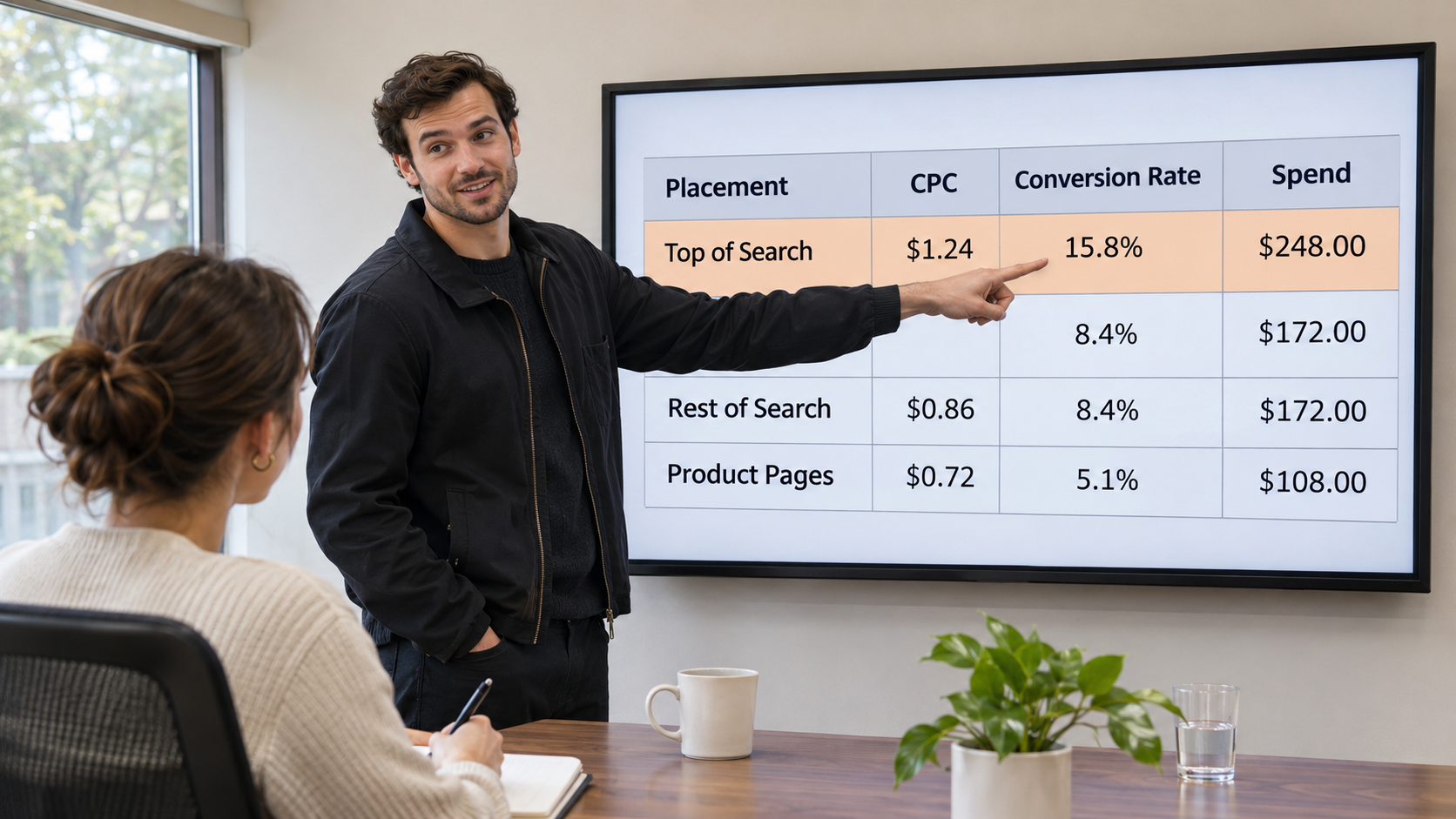
Increase placement bids where conversion and order value justify the higher CPC. Sponsored Products placement reporting lets you compare traffic across locations such as top of search and product pages. Use those results alongside your SKU targets.

Review the base bid and the placement adjustment together before you change either. Amazon's Sponsored Products bidding guide explains how bidding settings work together. Record both settings so you can trace changes in CPC.
Conversion Rates by Ad Placement
Calculate placement conversion as attributed orders divided by clicks for the same period. Suppose top of search converts at 12% with a $1.20 CPC. That works out to $10 in ad cost per order.
A product page placement converting at 8% with a $0.64 CPC costs $8 per order. Compare the sales value and costs of orders from each placement before choosing where to raise bids. Start with campaigns whose product mix makes the comparison meaningful.
Bid Adjustments Based on Placement Profitability
Raise a placement adjustment in a measured step when the placement has room below its cost target. Keep the base bid steady during the test. Watch whether CPC rises faster than conversion.
Log the change date, previous adjustment, and maximum extra spend. Review how the change affects the entire campaign, since spend can shift across placements. Revert if the added traffic consistently falls outside your contribution target.
Dayparting Based on Conversion Patterns
Dayparting can help when mature reporting shows a recurring difference in profitability by hour. Group nearby hours to reduce noise if orders are sparse. Use the marketplace or account time zone consistently.
Check whether campaigns regularly run out of budget before you interpret quiet periods. Late hours with few impressions give you little evidence about shopper demand. Resolve that budget constraint before deciding whether those hours deserve less exposure.
Data Requirements for Hourly Decisions
Collect hourly clicks, spend, and attributed orders across several comparable weeks. Confirm how the report assigns sales to hours and which time zone it uses. Allow enough time for orders to register before judging late traffic.
Exclude or flag stockouts, major promotions, and listing interruptions. Look for a consistent gap large enough to affect contribution after ads. When hourly data are thin, combine adjacent hours and reassess the wider block.
Schedule Tests Across Comparable Days
Test one schedule change across comparable weekdays in the same marketplace. Compare Mondays with other Mondays and keep pricing, bids, and listing content stable where possible. Record any changes during the test.
Track daily contribution alongside performance in the affected hours. A schedule can improve ACoS while reducing the day's total contribution. Restore those hours if the contribution lost outweighs the savings.
Budget Allocation Across Campaign Portfolios
Allocate more budget to campaigns that can spend additional money profitably. Look for repeated budget constraints, margin headroom, and sufficient inventory. The Amazon PPC budget calculator can help size a proposed increase.
Reserve a separate amount for discovery so established campaigns cannot absorb your entire testing budget. Review commitments by product group and marketplace. Keep the budget owner and review date visible in your reporting.
Budget Caps on Profitable Campaigns
Raise a daily cap when a campaign repeatedly stops serving while meeting its contribution target. Check the budget settings that apply to that campaign, including any portfolio constraint. Estimate how much extra spend you can evaluate before the next review.
Make a small enough change to isolate its effect. As a starting point, adding $20 to a $100 daily budget gives you a defined amount of additional exposure to evaluate. Review actual spend because the change in the cap may differ from the change in spend.
Spend Shifts Based on Incremental Returns
Move budget toward the campaign expected to generate more contribution from the next dollar. If an extra $100 buys five additional orders worth $12 each before ads, the increase costs $40 in contribution. Existing orders can keep the blended result looking healthy.
Use a comparable baseline or a matched group to estimate what would have happened without the increase. Check total SKU sales for signs that paid orders displaced purchases you would have earned anyway. Account for changes in price, stock, and promotions.
When applying Amazon PPC Advanced Tactics for Scaling Profitable Campaigns, judge the next dollar by the contribution it adds.
Performance Checks After Raising Spend
Review delivery and CPC soon after a budget increase, then evaluate profit after attributed orders mature. Compare the affected SKUs against the baseline and margin targets. Include total sales and inventory to give the advertising figures context.
Use the same reporting filters before and after the change. Track spending and contribution by marketplace so currency and fee differences stay visible. A consistent review is especially useful when several campaigns sell the same product.
Attribution Lag and Review Timing
Wait for the applicable attribution window before making a final profitability decision. An ad click can produce an order later, so recent spend may appear before the associated sales. Amazon's advertising cost of sales guide explains the metric and attribution context.
Do an early check for excessive spend, delivery issues, and stock problems. Schedule a later review using a comparable period with similarly mature data. Label recent figures as provisional in your reporting.
Thresholds for Reversing Spend Increases
Decide before launch how much additional spend or lost contribution you will tolerate. Set an immediate stop for clear delivery issues or a stock risk. Give efficiency metrics enough time to mature before applying the performance threshold.
Restore the last settings if the increase exceeds the agreed limit and mature results miss your target. Record which search terms or placements drove the change. Use that evidence to narrow the next test. keyword targeting guide.
Key Takeaways
Scale the SKU and traffic source that can turn additional spend into additional contribution. Establish the margin target first. Then use query and placement results to choose where to test.
Keep a brief change log with the reason, expected outcome, and review date. Give each test one primary metric and an explicit spending limit. Review it on the scheduled date.
- Set an ACoS ceiling and contribution goal for each SKU.
- Validate search terms and placements before funding them further.
- Compare mature results with your expected profit and spending limit.
Frequently Asked Questions
Use total sales and retail readiness alongside ad metrics to make scaling decisions. Review both paid performance and the conditions that allow your products to sell. Check day-to-day controls before applying bulk changes.
Confirm which products, marketplaces, and dates a report covers before comparing numbers. Use the same scope for internal reviews. Keep seller account and advertising access organized if several people make changes.
How does TACoS differ from ACoS in Amazon PPC?
TACoS divides ad spend by total Amazon sales. ACoS divides it by ad-attributed sales. Use the same dates and product scope when comparing them.
TACoS can fall as total sales grow faster than spending. That pattern alone cannot establish how many organic sales your ads caused. Compare contribution as well.
Should you scale Amazon PPC when inventory is low?
Hold broad spend increases when available inventory may run out before replenishment. Compare sellable days of cover with the expected date stock becomes available. Include extra time for receiving.
Reserve spend for the highest priority sales if you have enough units. Recheck your forecasts using the higher expected sales rate. Resume scaling once supply can support it.
How does losing the Featured Offer affect Amazon PPC?
Losing the Featured Offer can interrupt Sponsored Products delivery for the affected offer. Check eligibility, stock, and pricing before changing your ads. Review the relevant marketplace separately.
Compare impression changes with the timing of the eligibility issue. Monitor delivery as the offer recovers. Reassess bids once the campaign has enough fresh data.
Can you manage Amazon PPC in bulk through the ad console?
Yes, the ad console supports bulk management through downloadable and uploadable spreadsheets for supported entities. Start with the current account template. Verify campaign IDs before editing.
Keep the original export for reference. Upload a small set of changes and inspect the processing results. Verify the resulting settings before expanding the upload.
Conclusion
For established FBA brands, profitable scaling starts with a margin target for each SKU and a budget increase you can evaluate on its own. This week, pick one consistently profitable campaign that regularly runs out of budget, document its current spend and contribution, and run a measured increase. Check the mature results before committing more money.
If you run an established Amazon brand and want to see where your product page may be limiting ad conversion, request a listing review. Start with one priority product to identify improvements you can address before increasing spend. Request your Free Audit.