
Table of Contents 9 sections
Are you certain your Amazon products are being seen by every potential customer? Many sellers unknowingly sabotage their own visibility by misunderstanding one crucial element: keyword limits. Exceeding these limits can make your most important search terms completely invisible to Amazon's algorithm, costing you traffic and sales every single day.
Amazon's primary backend search term field has a strict limit of under 250 bytes. This limit, which includes spaces and punctuation, is crucial for your product's indexing and visibility. Understanding and optimizing within this and other keyword field limits is essential for driving traffic and boosting sales on the platform in 2026. This guide provides a complete breakdown of the rules and best practices you need to follow.
Understanding Amazon's Search Term Limits in 2026
The most critical concept to grasp is that Amazon measures its backend keyword limits in bytes, not characters. While for most standard English letters and numbers one character equals one byte, this is not always the case. Special characters, such as the copyright symbol (©) or accented letters (é), can take up two or more bytes each. This distinction is vital because it's easy to think you are within the limit when counting characters, while you have actually exceeded the byte allowance.
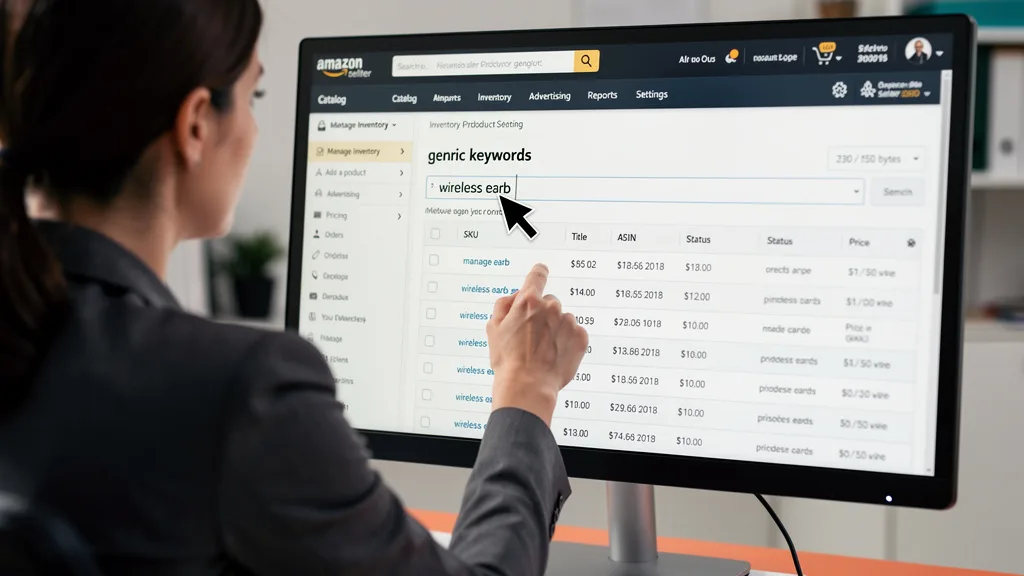
When you exceed the byte limit in any given field, Amazon's A9 algorithm simply stops reading. It doesn't give you a warning or an error message; it just ignores all the keywords that come after the cutoff point. This means your carefully researched search terms become completely ineffective, and your product will not be indexed for them. To avoid this, it's essential to use a tool that can measure bytes, not just characters, like the one covered in our Amazon listing character counter guide.
Character Limits for Different Amazon Keyword Fields
To build a fully optimized listing, you need to know the specific limits for every field where you can input keywords. These limits vary, and using each one to its full potential is key to maximizing your product's reach. From the customer-facing title to the hidden backend fields, each section plays a role in how shoppers find you.

Below is a summary of the key keyword fields and their respective limits as of 2026. Adhering to these guidelines ensures your listing is properly indexed and competitive.
| Field Name | Limit (Bytes/Characters) | Key Notes & Best Practices |
|---|---|---|
| Backend Search Terms | Under 250 bytes | The most important backend field for generic keywords. Spaces count. |
| Subject Matter | Under 250 bytes (50 per line) | Five lines of 50 bytes each. Not available in all categories. |
| Title | ~200 characters | Varies by category. This is a best practice for mobile and desktop visibility. |
| Bullet Points | ~500 characters total | Best practice is ~100 characters per bullet for readability, for a total of 500. |
| Other Attributes | Varies by field | Fields like Target Audience and Intended Use act as filters and keywords. |
Backend Search Terms (Generic Keywords)
The single most important backend field is the 'Search Terms' field, often called generic keywords. This field has a strict limit of under 250 bytes. This is where you place all the relevant search terms that you couldn't naturally fit into your title, bullet points, or description. Think of synonyms, common misspellings, and long-tail variations of your main keywords.
This field is completely hidden from customers, so its only purpose is to communicate with Amazon's search algorithm. You can find this field in the 'Keywords' tab when editing a product in your Amazon Seller Central account. Maximizing this space with highly relevant terms without exceeding the byte limit is a core component of effective Amazon SEO.
Subject Matter Keywords
Often overlooked, the 'Subject Matter' fields provide an additional opportunity to get indexed for more specific keywords. This section typically consists of five lines, each with a 50-byte limit, giving you a total of 250 extra bytes to work with. These fields are not available in every product category, but if they are present for your product, you should absolutely use them.
Use these fields for niche or highly specific long-tail keywords that define your product's purpose or theme. For example, if you sell a yoga mat, your generic keywords might include 'exercise mat' and 'workout mat', while your Subject Matter could include 'hot yoga accessories', 'non slip pilates mat', or 'meditation floor cushion'. This helps Amazon understand the specific context of your product.
"Many sellers completely overlook the Subject Matter fields. In competitive niches, correctly utilizing these 250 extra bytes can be the difference between page one and page five. It's a crucial part of a comprehensive conversion focused optimization strategy."
Other Keyword Attributes Explained
Beyond the primary keyword fields, Amazon provides numerous other attributes that contribute to your listing's visibility. These fields, such as 'Target Audience', 'Intended Use', and 'Style Name', function as both structured data for filtering and as searchable keywords. Filling out every relevant attribute is a simple yet powerful way to improve your discoverability.
When a customer uses the filters on the left-hand side of a search results page, Amazon pulls from the data you entered in these attribute fields. If you leave them blank, your product won't appear in those filtered results. Treat each of these fields as another chance to tell Amazon exactly who your product is for and how it should be used.
- Target Audience: Specify demographics like 'men', 'women', 'kids', or 'toddlers'.
- Intended Use: Describe activities, such as 'hiking', 'office', 'parties', or 'daily use'.
- Occasion Type: Target events like 'birthday', 'anniversary', 'graduation', or 'wedding'.
- Style Name: Define the aesthetic, for example, 'modern', 'vintage', 'bohemian', or 'minimalist'.
Keyword Usage in Title and Bullet Points
While not backend fields, your product title and bullet points are the most heavily weighted areas for keyword indexing and ranking. The title is your most valuable real estate. While limits vary by category, a general best practice is to keep titles around 200 characters for optimal display on both desktop and mobile devices. Your most important, highest-volume keywords should appear at the beginning of the title.
Your bullet points (Key Product Features) should be a strategic blend of persuasive, benefit-driven copy and essential keywords. You generally have up to 500 characters total across five bullet points. Weaving in secondary and long-tail keywords here not only helps with SEO but also answers customer questions and improves conversion rates by highlighting key features and uses.
Why Adhering to Character Limits Matters for Indexing
Understanding Amazon's keyword limits is not just about following rules; it's about ensuring your product can be found. The process of Amazon's algorithm discovering and categorizing your product for specific search queries is called placement indexing. If your keywords are not indexed, your product is effectively invisible to anyone searching for those terms. This is the primary reason why staying within the byte limits is non-negotiable.

Think of the 250-byte limit as a locked door. Everything you place within that limit gets seen by the algorithm. Everything you place after it, even by a single byte, remains outside and is completely ignored. This can lead to massive amounts of wasted effort. You could spend hours conducting keyword research to find the perfect terms, but if you simply paste them in and exceed the limit, that work yields zero return on investment.
Best Practices for Backend Keyword Optimization
Optimizing your backend keywords goes beyond just staying under the byte limit. It involves a strategic approach to ensure every byte is working to drive relevant traffic to your listing. Following these best practices will help you create a powerful backend keyword set that boosts visibility and sales.
Focus on Relevance over Sheer Volume
While it's tempting to stuff as many keywords as possible into the search terms field, relevance is far more important than volume. The A9 algorithm heavily favors keywords that lead to conversions. It's better to use 200 bytes of highly relevant, purchase-intent keywords than to fill all 249 bytes with terms that are only loosely related to your product. A high click-through rate followed by a low conversion rate can actually harm your ranking for a specific term.

Use keyword research tools to gather a broad list of potential terms, but then manually curate that list to include only the most relevant ones. Think like your customer. What words would they use to find your exact product? Focusing on this will not only improve your indexing but also the quality of the traffic you receive. This is especially important when you find low competition Amazon niches where precision matters.
Avoid Using Commas, Plurals, and Stop Words
To maximize your limited space, it's crucial to format your keywords correctly. Wasting bytes on unnecessary characters or redundant words is a common mistake. Amazon's system is smart enough to handle many variations, so you don't need to spell them all out.
- No Punctuation: Do not use commas, semicolons, or periods. Separate keywords with a single space.
- No Repetition: Never repeat a keyword. If it's in your title, it doesn't need to be in your backend.
- Singular Forms Only: Amazon automatically indexes for plurals and other minor variations (stemming). For example, entering 'pen' will also cover 'pens'.
- No Stop Words: Omit words like 'a', 'an', 'the', 'for', 'and', 'in', 'with', etc. They are ignored by the algorithm and waste space.
- No Competitor Brands: Using competitor brand names in your backend search terms is a violation of Amazon's Terms of Service and can get your listing suppressed.
Utilize All Available Space Within the Byte Limit
After prioritizing relevance and cleaning up your formatting, your final step is to use as much of the available space as possible without going over the limit. This is where you can add valuable long-tail keywords, common misspellings that customers might use, and synonyms that you couldn't fit into your main listing copy. Every byte of space is an opportunity to be discovered for a new search term.
Because it's impossible to accurately guess the byte count, using a dedicated tool is essential. An Amazon character counter that specifically measures in bytes will ensure you are precisely under the limit and not wasting any potential. You can find more information in our Amazon character counter guide. This simple check can be the difference between a fully optimized field and one that's only partially effective.
What Are Amazon's Hidden Platinum Keywords?
You may come across older articles or forums mentioning 'Platinum Keywords'. This has created a persistent myth that there is a secret field available only to special sellers. In reality, this feature is a relic of the past. Platinum Keywords were associated with a legacy 'Platinum Merchant' status that Amazon phased out many years ago.
For virtually all sellers on the platform in 2026, this field does not exist or has absolutely no impact on search ranking or indexing. If you happen to see a 'Platinum Keywords' field in an old or unusual category, you can safely ignore it. Your time and energy are far better spent optimizing the standard Search Terms (Generic Keywords), Subject Matter, and other available attributes that are proven to influence the A9 algorithm.
Common Mistakes to Avoid with Search Terms
Even seasoned sellers can make simple mistakes that hurt their listing's performance. Avoiding these common pitfalls is just as important as following best practices. A quick audit of your listings can often reveal easy-to-fix errors that could be costing you significant visibility.
- Exceeding the 250-byte limit: The most common and damaging mistake. All keywords after the limit are ignored.
- Using punctuation: Commas, semicolons, and periods are unnecessary and waste valuable bytes. Use single spaces only.
- Repeating keywords: Wasting space by including terms that are already in your title, brand name, or bullet points.
- Including competitor brand names: This is a policy violation and can lead to listing suspension. For more information, you can review Amazon's official guidelines.
- Wasting space on stop words: Words like 'for', 'with', and 'new' are filtered out by Amazon and should be omitted.
- Ignoring other attribute fields: Failing to fill out fields like Subject Matter, Target Audience, and Intended Use leaves ranking potential on the table.
- Forgetting that spaces count: Every single space is one byte. Double spaces or unnecessary spaces at the end of your keyword string reduce your available limit.
Key Takeaways
Mastering Amazon's search term limits is fundamental to success. By focusing on the right details, you can ensure your products are visible to the widest possible audience of relevant shoppers. Here are the most critical points to remember from this guide:
- The Golden Rule: Keep your main backend 'Search Terms' field under 250 bytes. This is a strict cutoff.
- Bytes, Not Characters: Always use a tool that measures in bytes to account for special characters that use more than one byte of data.
- No Punctuation or Plurals: Use single spaces to separate terms. Do not use commas, and rely on Amazon's algorithm to handle plurals and minor variations.
- Maximize All Fields: A complete keyword strategy involves optimizing the title, bullet points, 'Subject Matter' fields, and all other relevant attributes.
- Relevance is King: Prioritize keywords that have a high probability of conversion for your specific product over stuffing the field with loosely related terms.
- Don't Repeat Keywords: Use the backend to capture keywords you couldn't fit in the customer-facing copy. Redundancy wastes precious space.
Frequently Asked Questions
What is the difference between bytes and characters for Amazon keywords?
A character is a single letter, number, or symbol that you type. A byte is the unit of data that a computer uses to represent that character. For standard English letters (a-z) and numbers (0-9), one character equals one byte. However, special symbols (like © or ™) and accented letters from other languages (like é or ü) can take up two, three, or even four bytes each.
Amazon's backend search term limit is based on the total byte count, not the character count. This is why it's crucial to use a byte counter, as a list of 240 characters could easily exceed the 250-byte limit if it contains several special characters.
How many keywords can you use in an Amazon listing?
There is no fixed number of keywords you can use. The limitation is based on the total byte count within the designated fields. The main 'Search Terms' field allows for under 250 bytes, which could translate to dozens of short keywords or a smaller number of longer, more descriptive phrases.
Your goal should be to fit as many unique and relevant search terms as possible across all available fields, including your title, bullet points, and the various backend attributes, all while staying within their respective byte or character limits.
Should I repeat keywords in different fields on my Amazon listing?
No, you should not repeat keywords across different fields in your listing. Amazon's algorithm only needs to see a keyword once to index your product for it. Repeating a keyword that is already in your title or bullet points within the backend search term field is a waste of valuable space.
A better strategy is to use each field for a unique set of keywords. Use your title for the most important, high-volume terms. Use your bullet points for secondary keywords and features. Use the backend search term field for everything else, such as synonyms, misspellings, and long-tail terms you couldn't fit elsewhere.
Do spaces count towards the Amazon search term limit?
Yes, absolutely. Every space you use counts as one byte towards the total limit in the backend search term field. This is why it's critical to use only a single space to separate your keywords and to avoid any extra spaces at the beginning or end of your string.
Using punctuation like commas to separate keywords is a common mistake that wastes bytes, as the comma itself takes up a byte and you still need a space. Simply using spaces is the most efficient way to format your keyword list.
How often should I update my backend keywords for best results?
A good practice is to review and potentially update your backend keywords every 30 to 90 days. This allows enough time for the algorithm to process your changes and for you to gather sufficient performance data. The best source for new keywords is your own advertising data.
Regularly analyze your Amazon PPC Search Term Reports to identify new, high-converting queries that customers are using to find and buy your product. You can then add these proven terms to your backend fields. Also, consider updating keywords based on seasonality or emerging trends in your niche.
Conclusion
Ultimately, mastering the Amazon search term character limits is a non-negotiable skill for any serious seller in 2026. Adhering to the sub-250 byte rule for your backend keywords isn't just a best practice; it's the foundation of your product's discoverability. By using a byte counter, prioritizing relevance over volume, and strategically utilizing every available keyword field, you ensure the A9 algorithm can connect your product with the right customers. Your next step should be to audit your top-performing listings today and confirm they are fully compliant and optimized.
Feeling overwhelmed by the details of keyword optimization and scaling your brand? Our team specializes in profit-first growth for 7 and 8-figure Amazon sellers. Let an expert analyze your listings and uncover hidden opportunities to boost your visibility and sales. Get your no-obligation Free Audit today and see what you're missing.