
Table of Contents 8 sections
How much can you afford to pay for a click when a buyer could order one case or fifty? For Amazon PPC Bidding Strategies: Manual vs Automatic for B2B Sellers, use automatic targeting to discover converting searches and product pages. Use manual targeting to set individual bids for the keywords and products you want to manage directly.
Start each Sponsored Products campaign with a bid ceiling based on contribution margin and expected conversion rate. Give automatic campaigns a defined discovery budget, then move proven search terms into manual campaigns for tighter bid control. Review placement performance separately because a placement adjustment can raise your effective bid above the base bid you entered.
Amazon PPC Bidding by Targeting Type
Manual targeting lets you select keywords or products, while automatic targeting lets Amazon match your listing to relevant searches and products. You choose the targeting type when you create a Sponsored Products campaign. Both types can serve the same SKU while doing different jobs.

Give discovery its own budget so it can keep gathering data when your established targets are busy. Track spend and orders by campaign purpose. For the basic setup, see the Sponsored Products targeting guide.
Manual Targeting and Its Bid Controls
Manual targeting gives you bid control at the keyword or product target level. Keyword match types include broad, phrase, and exact. Product targeting lets you select individual ASINs or relevant categories.
For a case of shipping labels, start with specific searches that describe the dimensions and pack size. Give distinct bids to terms that attract different order quantities or margins. Use Amazon keyword grouping methods to keep those buying intents easy to compare.
Automatic campaigns offer a default bid or separate bids for close match, loose match, substitutes, and complements. Close and loose match relate to shopping queries. Substitutes and complements match your product to other products based on their relationship to it.
Review these groups separately since each can produce different click costs and order rates. You might bid more on close match for a technical spare part with precise compatibility requirements. Give complements a smaller test budget until the reports show whether those shoppers convert.
Starting Bids for B2B Products
Set your starting bid from the contribution your average order can support and the share of clicks you expect to convert. For a product sold in different pack sizes, start with the mix you typically sell. Include any business price or quantity discount customers actually receive.
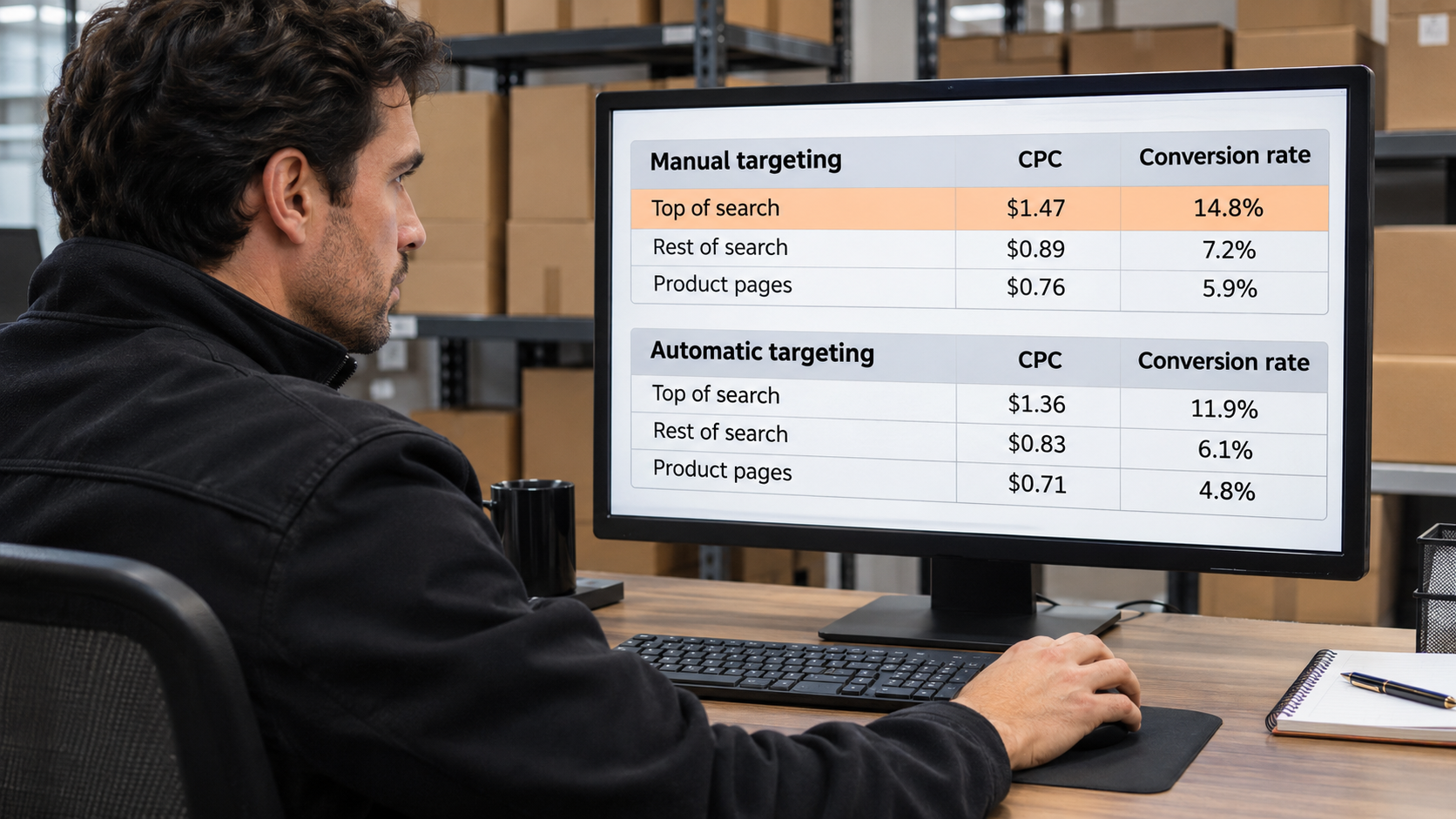
Check your unit economics by marketplace before copying campaigns across countries. Fulfillment fees, shipping costs, and pack economics can change the amount you can pay for traffic. Use the Amazon PPC budget guide to put per-click costs in the context of campaign spend.
Bid Estimates From Margin and Conversion Rate
Multiply pre-ad contribution per order by conversion rate to estimate your break-even cost per click. If an order contributes $30 and 8% of clicks convert, break-even CPC is $2.40. Use order contribution after product costs, applicable fees, and other variable costs.
To retain $12 from each order, you can spend $18 to acquire it. At the same conversion rate, your profit-focused CPC target is $1.44. Track those assumptions alongside actual CPC and update them as the order mix changes. Fulfillment fees.
“Start with what you need to keep from the order. In Amazon PPC Bidding Strategies: Manual vs Automatic for B2B Sellers, that figure sets the ceiling for either targeting type.”
Suggested Bids as a Launch Benchmark
Amazon’s suggested bid gives you a reference point for auction competitiveness. Compare it with your ceiling before taking it as a starting point. Your margin and conversion data determine what you can afford.
If the suggestion is $1.80 and your CPC target is $1.44, test near your target and monitor impressions. If delivery stays limited, try a more specific query or improve the listing’s fit first. Revisit after the campaign has had time to capture orders.
Campaign Bid Settings and Placement Adjustments
Campaign bid settings determine how Amazon can adjust your base bid, while placement adjustments change what you are willing to bid for particular placements. Pick a bidding strategy you can evaluate against your CPC ceiling. Record every active adjustment before you raise the base bid.
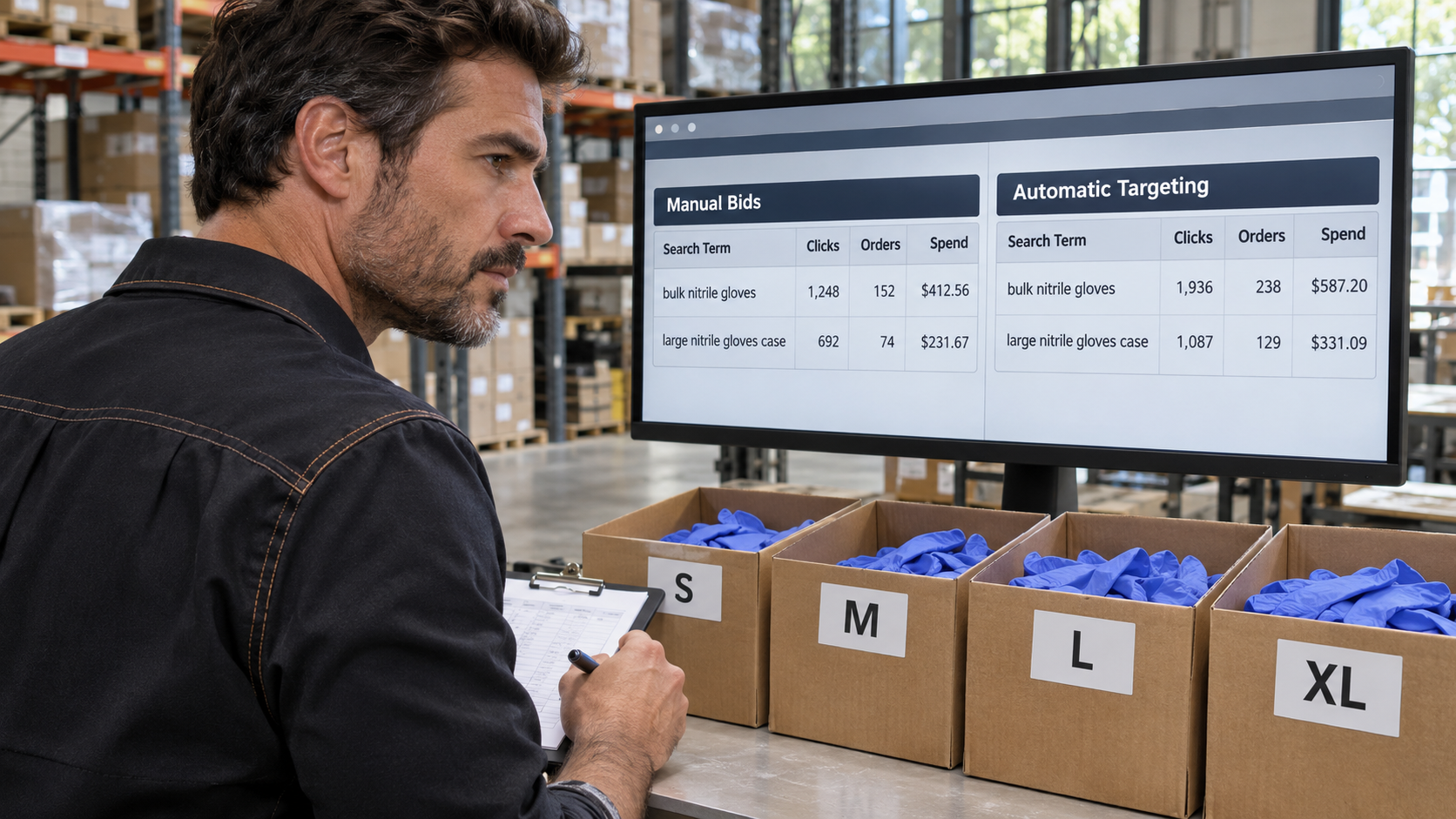
For launch tests, change one setting at a time so you can compare the results. Where you already have reliable order data, use it to decide which placements merit extra spend. Amazon explains the available settings in its Sponsored Products bidding guide.
Fixed Bidding and When to Use It
With fixed bidding, Amazon uses your bid without dynamically changing it based on estimated conversion likelihood. Configured placement adjustments can still affect the bid. The CPC you actually pay can differ from the amount you bid.
Try fixed bidding when you want to test a clear bid level on a tightly defined target. Keep the listing, targeting, and placements steady during the test. Compare actual CPC and contribution per order before expanding.
Dynamic Bidding and When to Use It
Dynamic bidding lets Amazon respond to the estimated likelihood of a sale. Down only lets Amazon reduce your bid on less promising opportunities. Up and down lets Amazon raise or lower it.
Start with down only when you have limited conversion data and want to limit bid increases. Consider up and down on targets with a reliable conversion history and enough margin to absorb higher CPCs. Check placement results before raising bids again.
Rule-Based Bidding and When to Use It
Rule-based bidding lets eligible campaigns use a return on ad spend goal to guide bid changes. Use your own contribution economics when choosing that goal. A revenue target can look healthy while discounted orders earn too little.
Test the setting on a campaign with consistent orders and a stable product mix. Check the console for eligibility before planning a rollout. Review profit after advertising alongside the reported return.
How Placement Adjustments Affect Your Bid
A placement increase raises the bid for impressions eligible for that placement. A $1.20 base bid with a 50% increase becomes $1.80 before any applicable dynamic adjustment. If your strategy can also raise bids, allow for both settings when establishing a ceiling.
Review placement CPC and conversion rate together. A placement with more orders can still deliver less profit if the clicks cost disproportionately more. Make the increase only when the economics support it.
| Setting | Effect on the bid |
|---|---|
| Fixed with no placement increase | $1.20 bid |
| Fixed with a 50% placement increase | $1.80 bid for eligible impressions |
| Dynamic down only with a 50% placement increase | Amazon can reduce the adjusted $1.80 bid |
Using Search Term Data to Refine Targeting
Use the search term report to see which shopper queries and matched products generated traffic and orders. Compare results by term before judging an entire automatic targeting group. Give recent clicks time to receive sales attribution before you act.
Review conversion alongside order contribution and listing fit. A phrase such as “bulk nitrile gloves” may generate orders across several sizes, while a query with a size and case quantity can signal a more specific need. Bid according to the economics you can observe.
Moving Proven Search Terms Into Manual Targeting
Move a query into a manual campaign when it shows relevant intent and repeatable results. Start with exact match when you want a dedicated bid for the term. Add a matched ASIN as a product target when its traffic justifies a separate bid.
Confirm that the new target is delivering before excluding the duplicate from discovery. Consider a negative exact for the query where you want to manage its traffic separately. Check total orders and spend across both campaigns after the change.
Adding Negative Targets for Irrelevant Traffic
Use negative targets when a search or product page is a poor fit for what you sell. Negative exact lets you exclude a specific query more narrowly. Negative phrase can cover a recurring mismatch across several queries.
Exclude clearly irrelevant traffic, such as a size your product cannot fit. For relevant terms with clicks and no orders, check whether spending has exceeded what you can afford to acquire an order. Review listing fit before deciding whether to cut the bid or exclude the term.
PPC Tools vs Manual Campaign Management
Use PPC tools when reporting and repeated bid changes take up too much of your team’s time. Manage bids by hand when the campaign set is small or changes depend on context your rules cannot see. Either approach needs a visible record of what changed.
Compare the cost of software with the hours you can recover and the reporting gaps it closes. Include time spent checking imports, rules, and exceptions. Pair that review with advanced Amazon PPC strategies for campaign decisions that still need judgment.
Use automation for repeatable work such as flagging high spend, consolidating reports, or applying bounded bid rules. Set minimum data requirements and a maximum change per run. Keep low-stock products and launches out of broad rules when they need separate handling.
Test rules on a subset of campaigns before expanding them. Check the history for the old bid, the new bid, and the trigger. Keep an export you can use to reverse an unwanted change.
Campaign Management by Hand
Manual campaign management works well when you can review the targets and order economics in one session. Use the Amazon Ads console, report exports, and a spreadsheet. Log the date, previous bid, new bid, and reason.
Inspect high-spend targets first and review low-volume targets over a longer window. Coordinate changes with inventory, pricing, and listing edits. Revisit your workflow when routine updates start crowding out analysis.
Key Takeaways
Use automatic campaigns to discover opportunities and manual campaigns to manage the targets you can value individually. Give each campaign a spending limit that reflects its role. Let your contribution margin determine how much traffic you can profitably buy.
Start your next review with one SKU and compare its search terms, placement performance, and actual CPC. Pick the change that addresses the clearest source of wasted spend or missed orders. Write down the result you expect before making it.
- Set a maximum CPC from contribution and conversion rate.
- Set aside discovery spend for new search terms and product targets.
- Check the combined effect of placements and bidding settings.
- Log each change and compare contribution after ad spend.
Frequently Asked Questions
Sponsored Products campaigns charge for clicks, can reach eligible Amazon Business shoppers, and keep their chosen targeting type after launch. Campaign budgets and other controls affect how your ads run. Check the options available in your marketplace before duplicating a setup.
When reviewing B2B performance, distinguish the cost of traffic from the value of orders. A low CPC can still be expensive if the shoppers rarely convert. Separate business placement results where your reporting supports that view.
How does Amazon PPC price each click?
Sponsored Products uses a cost-per-click auction. You pay when someone clicks your ad. The bid helps determine whether the ad can win an eligible placement.
Your actual CPC can differ from your base bid. Placement and bidding settings can alter the bid used for an opportunity. Use reported average CPC to assess what you paid.
Can Sponsored Products appear on Amazon Business?
Yes, eligible Sponsored Products ads can appear on Amazon Business. Availability and controls can vary by marketplace and campaign. Check your account for placement options.
Make pack quantities and specifications easy to find. Business buyers may compare case prices and delivery options before ordering. Check business placement performance separately when the data is available.
Can you change a campaign’s targeting type after launch?
You need a new campaign to switch between automatic and manual targeting. Select the desired type during campaign creation. You can advertise the same eligible products in the new campaign.
Export the old campaign’s search terms and settings first. Reuse relevant targets and negatives where supported. Confirm the new campaign delivers before reducing the old campaign’s budget.
Can Sponsored Products campaigns share a budget?
Each Sponsored Products campaign has its own daily budget. Where available, a portfolio budget cap can limit combined spending for grouped campaigns. Campaign settings still govern each individual budget.
Set budgets for discovery and established targets according to their roles. Track spend against both the campaign budgets and any portfolio cap. Review delivery when one group reaches its limit early.
Conclusion
The practical lesson behind Amazon PPC Bidding Strategies: Manual vs Automatic for B2B Sellers is to give each campaign a distinct job while holding both to the same profit standard. Use automatic targeting to learn which searches and products attract orders, then use manual campaigns to control bids on the targets with repeatable results. This week, pick one SKU, calculate your affordable CPC from contribution per order and conversion rate, and compare it with what you actually pay after placement adjustments.
If you sell on Amazon and want to see where your listing may be costing you conversions, send it over for a review. You’ll get a starting point for deciding which listing improvements to make before paying for more traffic. Request your Free Audit.